
Nothing happened, then enter the app. And many functions can not be used like saving settings or saving workspace.
I will try to send the console report.
Hi yuziyue,
This could be a missing font issue not a binary compatibility issue. So, that is why i need to know the console report. Sometimes, the system substitutes missing font for the required ones. And there you have a problem in reading the correct characters.
Best
K
So many things in the console. Which is useful for you? Sorry about that I never use the console before. Is my privacy in the report?
No of course. Not all.
You should try to find errors like here:
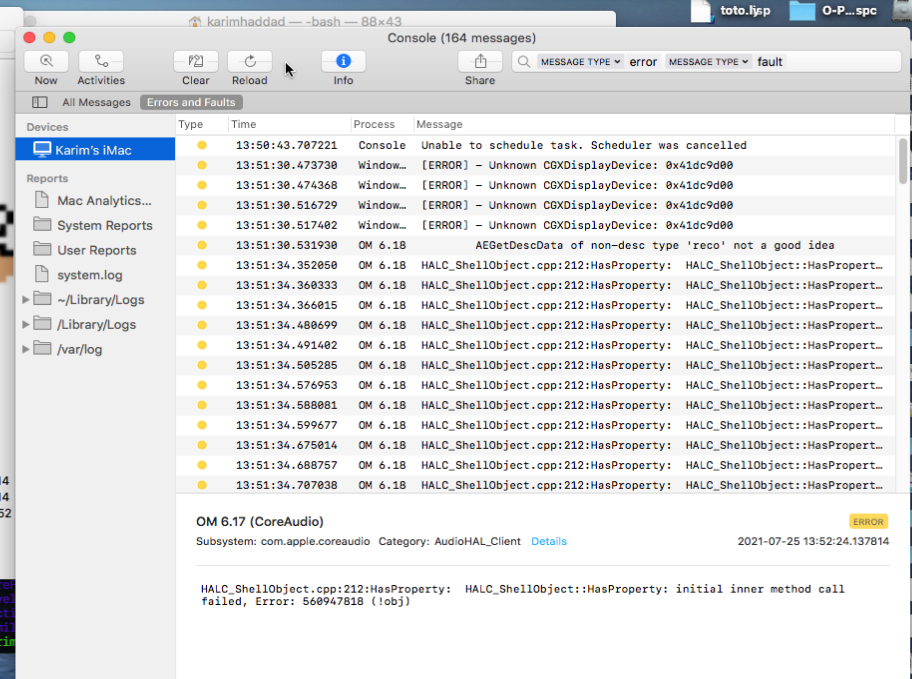
However i believe still it is a problem of missing fonts.
Can you check first if these fonts are present in your system:
Verdana, LucidaGrande, Times New Roman ?
Dear K,
The 3 fonts is in my system. Console report is here:
Best
Yu
| error | 18:33:41.963710+0800 | OM 6.19 | HALC_ShellObject::HasProperty: initial inner method call failed, Error: 560947818 () |
|---|---|---|---|
| error | 18:33:41.968039+0800 | OM 6.19 | HALC_ShellObject::HasProperty: initial inner method call failed, Error: 560947818 () |
| error | 18:33:41.974004+0800 | OM 6.19 | HALC_ShellObject::HasProperty: initial inner method call failed, Error: 560947818 () |
| error | 18:33:42.144330+0800 | OM 6.19 | HALC_ShellObject::HasProperty: initial inner method call failed, Error: 560947818 () |
| error | 18:33:42.150641+0800 | OM 6.19 | HALC_ShellObject::HasProperty: initial inner method call failed, Error: 560947818 () |
| error | 18:33:42.514513+0800 | OM 6.19 | HALC_ShellObject::HasProperty: initial inner method call failed, Error: 560947818 () |
| error | 18:33:42.517436+0800 | OM 6.19 | HALC_ShellObject::HasProperty: initial inner method call failed, Error: 560947818 () |
| error | 18:33:42.519866+0800 | OM 6.19 | HALC_ShellObject::HasProperty: initial inner method call failed, Error: 560947818 () |
| error | 18:33:45.735271+0800 | OM 6.19 | HALC_ShellObject::HasProperty: initial inner method call failed, Error: 560947818 () |
| error | 18:33:45.738790+0800 | OM 6.19 | HALC_ShellObject::HasProperty: initial inner method call failed, Error: 560947818 () |
| error | 18:33:45.742398+0800 | OM 6.19 | HALC_ShellObject::HasProperty: initial inner method call failed, Error: 560947818 () |
| error | 18:33:46.213592+0800 | OM 6.19 | HALC_ShellObject::HasProperty: initial inner method call failed, Error: 560947818 () |
| error | 18:33:46.217204+0800 | OM 6.19 | HALC_ShellObject::HasProperty: initial inner method call failed, Error: 560947818 () |
| error | 18:33:46.221532+0800 | OM 6.19 | HALC_ShellObject::HasProperty: initial inner method call failed, Error: 560947818 () |
| error | 18:33:46.681406+0800 | OM 6.19 | HALC_ShellObject::HasProperty: initial inner method call failed, Error: 560947818 () |
| error | 18:33:46.683166+0800 | OM 6.19 | HALC_ShellObject::HasProperty: initial inner method call failed, Error: 560947818 () |
| error | 18:33:46.685163+0800 | OM 6.19 | HALC_ShellObject::HasProperty: initial inner method call failed, Error: 560947818 () |
| error | 18:33:46.917582+0800 | OM 6.19 | HALC_ShellObject::HasProperty: initial inner method call failed, Error: 560947818 () |
| error | 18:33:46.921385+0800 | OM 6.19 | HALC_ShellObject::HasProperty: initial inner method call failed, Error: 560947818 () |
| error | 18:33:46.925534+0800 | OM 6.19 | HALC_ShellObject::HasProperty: initial inner method call failed, Error: 560947818 () |
| error | 18:33:06.678127+0800 | tccd | Prompting policy for hardened runtime; service: kTCCServiceAppleEvents requires entitlement com.apple.security.automation.apple-events but it is missing for accessing={identifier=fr.ircam.repmus.openmusic, pid=1337, auid=501, euid=501, binary_path=/Applications/OM 6.19.app/Contents/MacOS/OM 6.19}, requesting={identifier=com.apple.appleeventsd, pid=287, auid=55, euid=55, binary_path=/System/Library/CoreServices/appleeventsd}, |
|---|---|---|---|
| error | 18:33:07.668684+0800 | OM 6.19 | AddInstanceForFactory: No factory registered for id <CFUUID 0x60000020cb20> F8BB1C28-BAE8-11D6-9C31-00039315CD46 |
| error | 18:33:07.886373+0800 | OM 6.19 | +[MTLIOAccelDevice registerDevices]: Zero Metal services found |
| error | 18:33:19.253719+0800 | tccd | Prompting policy for hardened runtime; service: kTCCServiceAppleEvents requires entitlement com.apple.security.automation.apple-events but it is missing for responsible={identifier=fr.ircam.repmus.openmusic, pid=1337, auid=501, euid=501, responsible_path=/Applications/OM 6.19.app/Contents/MacOS/OM 6.19, binary_path=/Applications/OM 6.19.app/Contents/MacOS/OM 6.19}, accessing={identifier=com.apple.appkit.xpc.openAndSavePanelService, pid=1340, auid=501, euid=501, binary_path=/System/Library/Frameworks/AppKit.framework/Versions/C/XPCServices/com.apple.appkit.xpc.openAndSavePanelService.xpc/Contents/MacOS/com.apple.appkit.xpc.openAndSavePanelService}, requesting={identifier=com.apple.appleeventsd, pid=287, auid=55, euid=55, binary_path=/System/Library/CoreServices/appleeventsd}, |
| error | 18:33:19.424122+0800 | tccd | Prompting policy for hardened runtime; service: kTCCServiceAppleEvents requires entitlement com.apple.security.automation.apple-events but it is missing for responsible={identifier=fr.ircam.repmus.openmusic, pid=1337, auid=501, euid=501, responsible_path=/Applications/OM 6.19.app/Contents/MacOS/OM 6.19, binary_path=/Applications/OM 6.19.app/Contents/MacOS/OM 6.19}, accessing={identifier=com.apple.quicklook.QuickLookUIService, pid=1341, auid=501, euid=501, binary_path=/System/Library/Frameworks/Quartz.framework/Versions/A/Frameworks/QuickLookUI.framework/Versions/A/XPCServices/QuickLookUIService.xpc/Contents/MacOS/QuickLookUIService}, requesting={identifier=com.apple.appleeventsd, pid=287, auid=55, euid=55, binary_path=/System/Library/CoreServices/appleeventsd}, |
| error | 18:33:19.680310+0800 | tccd | Prompting policy for hardened runtime; service: kTCCServiceCalendar requires entitlement com.apple.security.personal-information.calendars but it is missing for responsible={identifier=fr.ircam.repmus.openmusic, pid=1337, auid=501, euid=501, responsible_path=/Applications/OM 6.19.app/Contents/MacOS/OM 6.19, binary_path=/Applications/OM 6.19.app/Contents/MacOS/OM 6.19}, accessing={identifier=com.apple.appkit.xpc.openAndSavePanelService, pid=1340, auid=501, euid=501, binary_path=/System/Library/Frameworks/AppKit.framework/Versions/C/XPCServices/com.apple.appkit.xpc.openAndSavePanelService.xpc/Contents/MacOS/com.apple.appkit.xpc.openAndSavePanelService}, requesting={identifier=com.apple.mds, pid=98, auid=0, euid=0, binary_path=/System/Library/Frameworks/CoreServices.framework/Versions/A/Frameworks/Metadata.framework/Versions/A/Support/mds}, |
Hi yuziyue
Well this was helpful, Thank you for your last report. It seems this has nothing to do with fonts. But this has to do with apple security signature, OM was signed indeed with correct apple signature. But apparently it demands more entitlements now for the new Mac M1. I will try to recompile it again but i cannot unfortunately test it since i don’t have an M1 mac. So it will be a beta release.
Best
K
Thanks so much!kind of you. Don’t worry about that because i have an older Mac to use ON. 
Good to know. May I ask you which OS your old mac is running. Because it seems it is not the M1 chip which is problematic but the OS Big Sur. So if you are running on Big Sur i would be glad to know if it works or not.
Thank you again for your feedback.
Best
K
Oh but It’s 10.15. I don’t update it to 11 which is really dangerous.
I completely agree.
Hi again,
Apparently OM is running under Big Sur with a Mac M1 Chip. A colleague just tested it without problems. So it is not related to entitlements.
But just in case, are you running OM under Rosetta 2? if not please do the following:
1- select OM 6.19.app
2- type cmd+i
3- check open like in this following example:
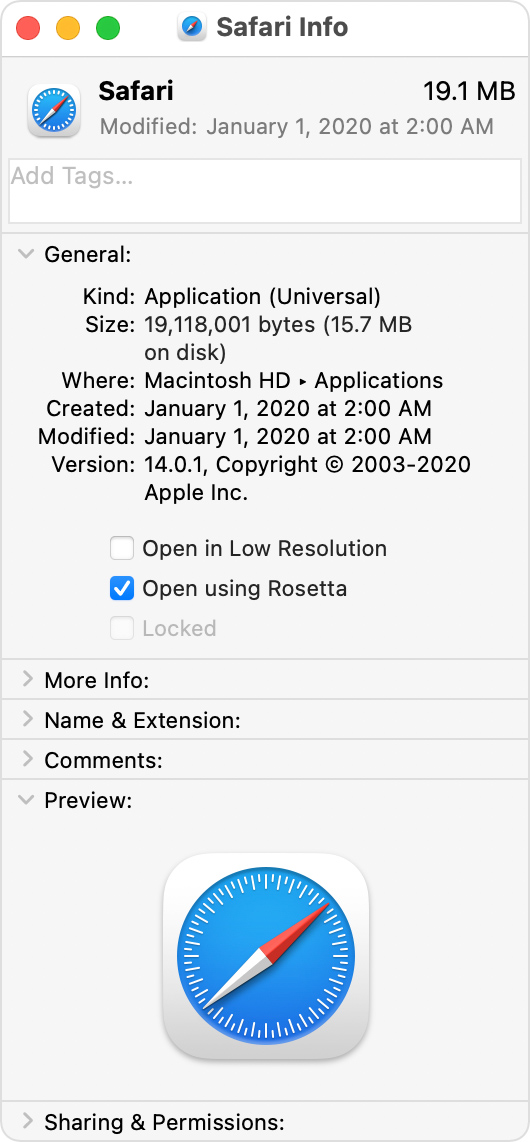
Hoping this will work.
Best
K
I tried. But there is not the options in my Mac.
This means that rosetta 2 is not installed, therefore, OM will not run because it is an x86/64 bit image. So you will need to install rosetta2. See here:
Best
K
I installed Rosetta before and the other apps has the option like Safari. I don’t konw why.
Can you send a screenshot of OM info just to see.
and by the way are you administrator of your machine?

Yes, very strange indeed.
As soon as i can use a mac m1 i will test this issue. Strange since a fellow developer tested it on this kind of machine and it did work ok with rosetta2.
Sorry about all this inconvenience.
Best
K
Maybe I think I activated this Mac in Chinese before changing language to English. So like you said it has some font issue. But interesting thing is my older Mac system language is Chinese now and OM can running good. hah.
In all, thanks so much!
Best
YU